
Personally a fan of VAIO wallpapers at the moment. Scroll down to 'Artist,' not the PC history crap.
10.18.2008


10.16.2008
SonicStage V
I'm sure not many people were as excited as I was when Sony announced the release of SonicStage V, a rather crash-prone and cumbersome application that manages your music. Well, a Walkman user like myself, and especially those with the Japanese models, is pretty much stuck with SonicStage for now. Even worse, the A820 series apparently has some incompability issues with SonicStage CP that made me reflash the memory a couple of times...
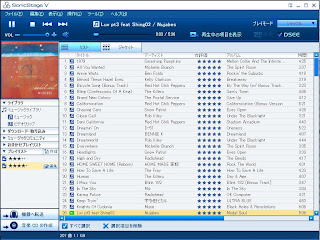
The upgraded player isn't too exciting except maybe that you can find whatever song you're currently listening to in the library with one click (yes, it used to be really lame), for rating purposes in my case. Maybe I like the colors more... or something.
My biggest complaint was the "info" tab with a flash ad, which is not only annoying to look at but wastes resources. Luckily, I found a way to get rid of it thanks to these blogs: http://blog.livedoor.jp/orcinus_/archives/51757103.html and http://taiseiko.blog.so-net.ne.jp/2008-10-13 (both Japanese), but it does also get rid of some other new features like album art and artist visualizers. That's okay though.
Here are the English instructions to do so (I take no responsibility if anything goes wrong):
--------------------------------------
Getting rid of the box:
1. Close SonicStage V
2. Go to C:¥Documents and Settings¥All Users¥Application Data¥Sony Corporation¥SonicStage V¥Data¥XML¥Blue (Windows XP) or C:\ProgramData\Sony Corporation\SonicStage V\Data\XML\Blue (Windows Vista)
3. Open FullMode.xml in editor of choice (optional: back it up).
4. Under <!-- PortWindow -->, on line 354, change160 to 0 .
5. Under <!-- ContentsArea -->, on line 363, change 160 to 0 .
Getting rid of process:
1. Close SonicStage V and go to regedit
2. Navigate to HKEY_LOCAL_MACHINE\SOFTWARE\Sony Corporation\SonicStage V
3. Export key Promotion to backup, then delete it.
--------------------------------------
Voilà.
10.12.2008
7.20.2008
The Dark Knight is out
Went to see The Dark Knight on opening night.. and it was as great as expected. Still don't know how Blender works... but just another application.. (1280x800 at deviantART)
The Dark Knight 2 by ~tamumu61 on deviantART
The Dark Knight 2 by ~tamumu61 on deviantART
7.12.2008
The Dark Knight
in... 5.5 days! Wallpaper based on graffiti. I'm starting to feel that my laptop screen is a lot more vibrant than most out there so the blue/green might not appear as rich on some monitors... Same for the previous Batman wallpaper with the dark brown gradient.. (1280x800 download at deviantART).
The Dark Knight by ~tamumu61 on deviantART
I also just uploaded the original graffiti for the previous Batman wallpaper.

The Dark Knight by ~tamumu61 on deviantART
I also just uploaded the original graffiti for the previous Batman wallpaper.

6.25.2008
Batman Logo


6.18.2008
PSP Firmware 4.0 out
This latest upgrade adds a google search function right from the home menus, video playback at different speeds, and closed caption for oneseg TV if you have that. Not ridiculously exciting for me but worth checking it out.
Subscribe to:
Posts (Atom)


